
On this page
The question we expect to be asked first is this one: I have lost my phone and my recovery code, can you get my notes back? The answer is no, and it is not a policy we could be persuaded to bend. The capability does not exist.
This post explains what the recovery code is, when you need it, why we cannot reset it, and how to make sure you never have to find out.
What the recovery code is
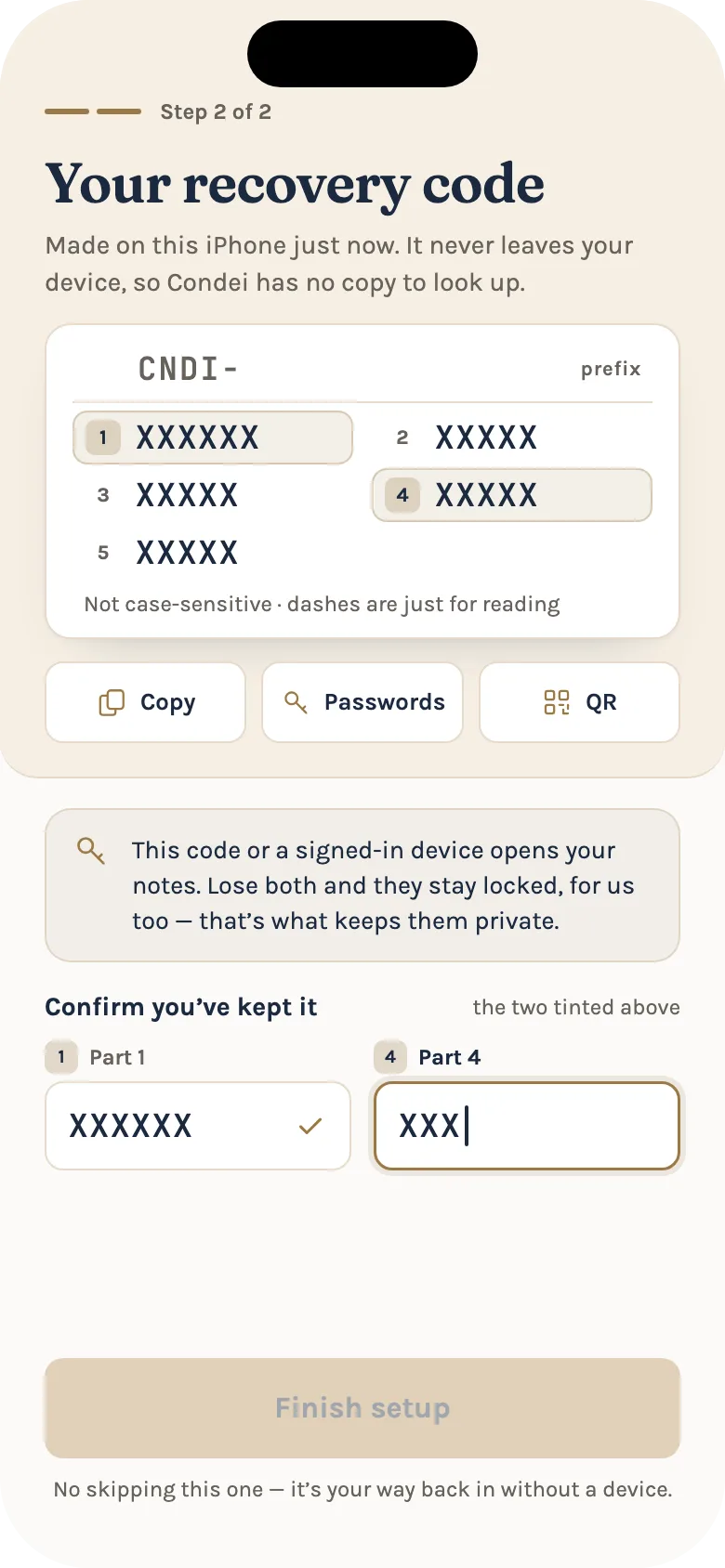
The recovery code is 26 characters, shown in groups as CNDI-XXXXXX-XXXXX-XXXXX-XXXXX-XXXXX. It is generated on your device, from 128 bits of randomness, and our server never sees it.
It is written in an alphabet that avoids lookalike characters. It is not case-sensitive, and if you type an I or an L it is read as a 1, and an O as a 0.
What it does is open one of the wrapped copies of your master key. Your notes are locked with a key that exists only on your devices, and that key is wrapped separately by each thing that can open it: your password if you have one, your recovery code, each device's secure hardware, and a passkey where your authenticator supports it. The recovery code is one of those, and it does not depend on any of the others.
Setup shows it to you once and asks you to re-type two of its groups before it will finish. That step is deliberate. For an account that signs in with Apple or Google it is the one point at which your notes become recoverable at all, so it cannot be skipped.
When you need it
Most days, never. You need it when a device that has never opened your notes needs to, and there is no device already signed in that can approve it. Signing in with Apple or Google proves who you are but does not produce a key, so an account that signs in only that way, with no recovery code and no second device, has no offline way back to its notes.
What you can do depends on what you still have:
| What you still have | What you can do |
|---|---|
| Your recovery code | Sign in, unlock everything, and set a new password if you want one |
| Another device that is still signed in | Approve the new device from it, unlock everything |
| Only your password | Sign in and unlock everything |
| Only access to your email | Reset your sign-in password. Your existing notes stay locked |
| None of the above | Your notes cannot be recovered |
Why we cannot reset it
If a person loses every credential that unwraps the master key, the data is gone. Not "gone unless you contact support": gone. The server does not hold a copy of the master key in any form it can open, and no employee can open one.
This is the same fact as in the first post, seen from the other side. We cannot read your notes because we have never held a key that opens them. A reset button would need exactly such a key. A recovery that we could perform on your behalf would be a recovery that anyone who convinced us, or compromised us, could perform on theirs.
That is also why resetting your password is not the same as recovering your notes. A password reset lets you sign in again, but a new password cannot unwrap a key that was wrapped with the old one. Your old notes stay on the device as encrypted items, shown as "N notes locked", and the app keeps them rather than deleting them. If your recovery code turns up in a drawer six months later, they all come back.
So when you write to us, we will tell you the same thing whoever you are, including if you are the account holder. We never ask for, and cannot use, a password, a recovery code, a master key or a two-factor code. Please do not send one. Anyone who says they can recover your notes, including someone claiming to be us, is not us.
If every way in is gone, the app offers to start a fresh vault. It keeps your account, sign-in and email address, and discards the old encrypted data, which nobody could have read anyway. It asks you to type a confirmation first, and it gives you a new recovery code.
How device transfer avoids needing the code
Most of the time you add a device the other way. Sign in on the new device, choose Approve from another device, and both screens show the same six-digit code. Check that they match, then approve on the device you already have. It takes under a minute, and you never type the recovery code.
Behind that, our server only relays two public keys and one sealed blob. The approving device sends the key only after you confirm the two codes match, so a rogue device offered by a malicious server would show a different number.
On Apple devices, a second Apple device usually finds the key in your iCloud Keychain and needs no approval at all. On Android, the equivalent, Google Block Store, is on by default and can be switched off in Settings.
When a device asks to join your account, when one is added, and when your recovery code is used, we send an alert to your other devices that allow notifications. Those alerts never contain your notes.
Where to keep it
Save it in a password manager. Setup offers to hand it to your password manager's AutoFill or Android's Credential Manager, and also to copy it, show it as a QR code or send it through the share sheet.
We deliberately do not email it to you. Email is the weakest link in most people's security, and an emailed code would sit in a mailbox that your sign-in provider can read. For the same reason, do not email it to yourself.
Keep it apart from your backup codes. If you use two-factor authentication, the backup codes get you past the sign-in prompt and do not unlock your notes. The recovery code does the opposite: it unlocks your notes and is not a sign-in code.
Treat it as seriously as the vault itself. If someone has the code and access to your account, they have your notes. If you think it has leaked, rotate your master key from a device you trust. That re-keys the account, signs every other device out and gives you a new recovery code.
If you have lost it but still have a device
Nothing is lost if you still have a signed-in device, or know your account password. Open Settings → Security and make a new recovery code, then save it somewhere you will find it. The new code replaces the old one, and the old one stops working at once. There is no "view my code" anywhere, on your device or on our servers: the code was shown once and never stored, so the only option is to make a new one.
The check on the code happens on your device. Attempts to use it are rate limited, and a burst of failures notifies you.
The short version
Keep the code in a password manager, set up a second device, and if you ever lose the lot, write to us on the support page and we will tell you honestly what is possible. The trade is the one in the first post: nobody but you can open your notes, so nobody but you can get them back.